

The open-source companion SDK to the Median and Turbo Renko indicator bundle for MetaTrader 5.
It provides what is needed to build Expert Advisors and indicators that run directly on Renko charts: a client library that reads the Renko indicator's buffers, a shim that ports ordinary MT5 indicators onto Renko OHLC values, 64 already-ported indicators, and six working EAs.
An EA built with this SDK inherits the settings of the Renko chart it is attached to — there is no need to duplicate the indicator's configuration in the EA's own inputs.
The Renko engine itself is not in this repository. The bar-building engine ships as a compiled indicator, purchased separately — see Getting the indicator. What lives here is the source for everything that consumes the bars it produces.
| Platform | MetaTrader 5 |
| Compiler | MetaEditor (bundled with MT5, Windows only) |
| Indicator | Median and Turbo Renko indicator bundle, Ultimate Renko, or P‑Renko — see Selecting your edition |
Download the archive from the latest release — it carries the sources
and the compiled binaries. Copy the Include, Indicators and Experts folders into the
MQL5 sub-folder of your MetaTrader data folder (File → Open Data Folder in the terminal),
merging them with what is already there, then restart MetaTrader.
Cloning the repository instead gives you the sources without binaries; compile them in MetaEditor (F7) after copying.
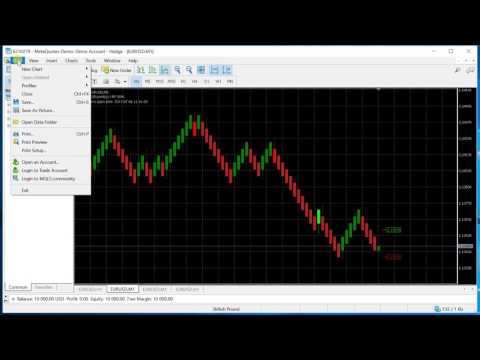
The same Renko engine is sold in more than one edition, and each is installed under a different
indicator name. The SDK calls it by that name through iCustom(), so the edition has to be
selected at compile time — in Include/AZ-INVEST/CustomBarConfig.mqh.
This repository ships configured for the MQL5 Market edition:
#define MQL5_MARKET_VERSION
#define ULTIMATE_RENKO_LICENSE
If you bought Ultimate Renko from az-invest.eu, comment out the first line:
//#define MQL5_MARKET_VERSION
#define ULTIMATE_RENKO_LICENSE
then recompile (F7). The full mapping:
| You bought | CustomBarConfig.mqh |
Indicator it looks for |
|---|---|---|
| Median and Turbo Renko indicator bundle (MQL5 Market) | MQL5_MARKET_VERSION + ULTIMATE_RENKO_LICENSE — the default |
Market\Median and Turbo renko indicator bundle |
| Ultimate Renko (az-invest.eu) | ULTIMATE_RENKO_LICENSE only |
UltimateRenko |
| P‑Renko BR Ultimate | P_RENKO_BR_PRO |
P-RENKO BR Ultimate |
| P‑Renko (all) | P_RENKO_BR_PRO + P_RENKO_ALL |
P-RENKO |
If the EA or a ported indicator loads but shows nothing, this is the first thing to check. A mismatch here means
iCustom()is asking for an indicator you do not have installed, which produces an empty chart rather than an error message.
Editions for the sibling products — Range Bars, Tick Chart, Volume Chart, Seconds Chart, Line
Break — are selected by the remaining #defines in the same file, but their headers ship with
those products and are not included here.
| Path | Contents |
|---|---|
Include/AZ-INVEST/SDK/ |
Client library and helper classes |
Include/AZ-INVEST/CustomBarConfig.mqh |
Product edition selection (#define ladder) |
Indicators/MedianRenko/ |
64 indicators ported to Renko |
Experts/ |
Six EAs — three examples, three ready to trade |
Each directory mirrors its counterpart under MQL5/, which is why the install step is a straight
copy.
| Header | Purpose |
|---|---|
MedianRenko.mqh |
The MedianRenko class — handle acquisition and buffer access for the Renko indicator. This is the one to include in an EA. |
MedianRenkoIndicator.mqh |
The MedianRenkoIndicator class — patches an ordinary MT5 indicator to calculate on Renko OHLC values. |
CommonSettings.mqh, RenkoCustomChartSettings.mqh |
Read the settings in use on the Renko chart, so an EA adopts them automatically. |
| EA | Demonstrates |
|---|---|
ExampleEA.mq5 |
A minimal skeleton showing the MedianRenko class methods. |
ExampleEA2.mq5 |
Trading decisions driven by the SuperTrend indicator on Renko. |
ExampleEA3.mq5 |
Consuming an indicator from Indicators/MedianRenko/ — RSI values written to the log. |
| EA | Strategy |
|---|---|
2MA_Cross.mq5 |
Two–moving-average cross, with fixed stop loss, take profit and trading hours. |
PriceMA_Cross.mq5 |
Price/MA cross, with the same risk and session controls. |
Renko_EA.mq5 |
The full EA: the common Renko entry and exit signals, flexible filters and an optional trailing stop. |
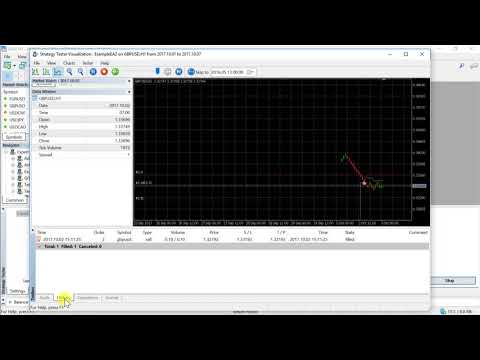
2MA_Cross and PriceMA_Cross read moving-average values from the Renko indicator's buffers.
If MA1/MA2 are not enabled on the indicator, these EAs receive no data and will not trade.
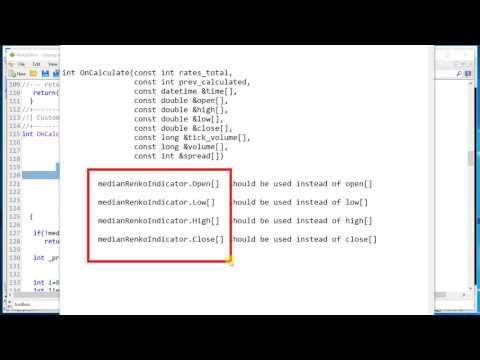
The indicators in Indicators/MedianRenko/ all follow one pattern, applied consistently. The same
pattern applies to any standard MT5 indicator.
MetaEditor compiles the sources: press F7, or run metaeditor64.exe /compile:<path> headless.
There is no macOS or Linux MQL5 compiler.
Check Selecting your edition before your first build — the binaries in a
release are compiled for the MQL5 Market edition, so owners of Ultimate Renko from az-invest.eu
need to change one #define and recompile.
This repository contains sources only. Compiled .ex5 files are not committed — continuous
integration compiles every source in Experts/ and Indicators/MedianRenko/ on each push and pull
request, failing on any error or warning, and attaches the binaries to each
release. A release archive's binaries are therefore always built from exactly the
sources beside them.
So: compile locally with MetaEditor, or download a release if you would rather not.
| Platform | Product | Where |
|---|---|---|
| MetaTrader 5 | Median and Turbo Renko indicator bundle | MQL5 Market |
| MetaTrader 5 | Ultimate Renko indicator generator | az-invest.eu |
| MetaTrader 4 | Median Renko plug-in | az-invest.eu |
Both MT5 editions are the same engine and both work with this SDK — they differ only in the indicator name, which is what Selecting your edition is about.
Released under the GNU General Public License v3. Individual indicators under
Indicators/MedianRenko/ are third-party sources carrying their own licences — check a file's own
header before redistributing or relicensing it.
The EAs and indicators in this repository are provided for educational and informational purposes only, and are not advice or an invitation to trade. Applying the techniques, ideas and suggestions in these files and videos is done at the user's sole discretion and risk.